Talk Faster, Work Smarter: Designing Seamless Audio Messaging for Pronto
Designing Seamless Audio Messaging for Fast-Moving Teams
My Role
Lead UX Designer – UX Strategy, Research, Design & Execution
Team
Product Manager
3 Developers (iOS, Android, Web)
CTO
Results & Metrics
Targets
Adoption Rate
30%
Engagement Rate
40%
Actual Results
Adoption Rate
40% — exceeded goal by 10%
Engagement Rate
60% — exceeded goal by 20%
Overview
In industries that rely on rapid communication—such as door-to-door sales, multi-level marketing, and education—the ability to send voice messages is critical. Yet, Pronto lacked this capability. Users needed a fast, intuitive way to send and store audio messages. My challenge? Designing an effortless voice messaging experience that felt like second nature, while ensuring it aligned seamlessly with Pronto's existing ecosystem.
The Problem
Pronto's users were stuck typing when they needed to talk. Sales reps in the field couldn't slow down to text, educators needed quick voice updates for their teams, and pest control dispatchers were losing time on manual communication. Without audio messaging, users were forced into slower workflows that didn't match the pace of their work.
Research Insights
One pest control company reported that 75% of their messages are audio.
Sales reps need to record on the go—text slows them down.
Adding audio transcriptions would make the feature even more useful.
5-minute message limit was ideal—longer messages were ignored.
Design Process
Discovery Research
Deep discovery research with data-driven user personas across door-to-door sales, pest control, security, and education sectors.
User Interviews
12 professionals across multiple industries. 30–45 minute recorded Zoom sessions uncovering real communication pain points.
Core Requirements
Distilled insights into three must-haves: playback before & after sending, manual start & stop recording, and send & delete control.
Competitive Analysis
Analyzed Slack, Facebook Messenger, WhatsApp, and iOS native voice messages in FigJam to identify best practices and differentiation opportunities.
Sketching & Wireframing
Hand-drawn paper sketches followed by three rounds of low-fidelity wireframes in Figma (V1, V2, V3), each refined with user feedback.
User Testing & Hi-Fi Mockups
12 real users tested a highly interactive Figma prototype across 30–45 minute Zoom sessions, validating the final design for iOS, Android, and Web.
Testing Insights
""Very easy to use" — Users quickly understood the feature with minimal guidance."
""We would use this primarily on mobile" — Reinforced our mobile-first prioritization."
""Audio transcriptions would be a game-changer" — Flagged for future roadmap."
"Users loved the design consistency across both mobile and desktop."
Discovery Research: Understanding Who We're Designing For
Every great feature starts with understanding the people who will use it. I led deep discovery research across Pronto's key user groups—door-to-door sales teams, pest control dispatchers, security coordinators, and educators—to uncover their daily communication struggles.
From these conversations, I developed data-driven user personas that kept our team grounded in real-world needs rather than assumptions. These personas weren't a one-time exercise—we continuously refined them throughout the project as new insights emerged from interviews and testing.
Example Persona: Door-to-Door Sales Representative
- Always on the go—needs quick voice updates between stops
- Sends voice messages to teams and customers far more than text
- Time-sensitive tasks—needs a feature that doesn't slow them down
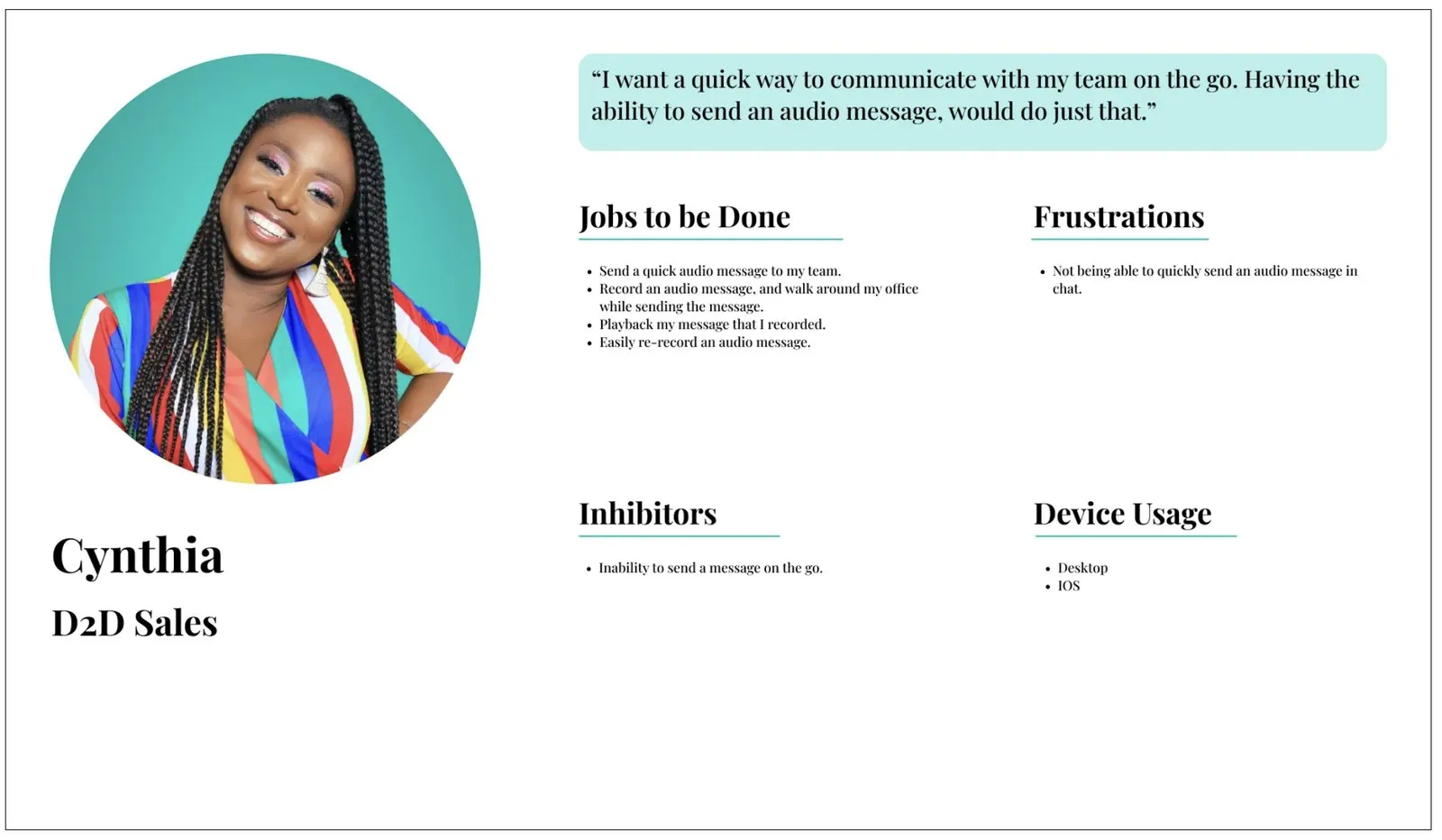
Example Persona: Door-to-Door Sales Representative
User Interviews: Listening to Real Voices
We interviewed 12 professionals from pest control, security, education, and sales—scheduled through our customer success team and conducted as 30–45 minute recorded Zoom sessions.
Key Questions We Asked
- When do you see yourself using audio messages?
- How would you like to play back voice messages?
- What's the ideal length for an audio message?
Insights That Shaped Our Approach
- One pest control company told us: "75% of our messages are audio"
- Sales reps need to record on the go—typing slows them down significantly
- Audio transcriptions surfaced as a high-value future feature
- 5-minute message limit was the sweet spot—longer messages were routinely ignored
Defining the Core Requirements
With research in hand, we distilled our findings into three non-negotiable features that would make or break the experience:
- Playback before & after sending — users need to review messages before sending and replay them in chat
- Manual start & stop recording — sales reps want tap-to-record, tap-to-stop for maximum flexibility
- Send & delete control — users need full ownership over what they send
Designing the Solution: Ideation & Competitive Analysis
I facilitated an interactive ideation session with the product team, ensuring every perspective shaped the design direction. To ground our work in industry best practices, I conducted a competitive analysis in FigJam, breaking down how leading platforms handle voice messaging.
Platforms Analyzed
- Web: Slack, Facebook Messenger
- iOS: Native Voice Messages, WhatsApp, Slack
- Android: Slack, Facebook Messenger
These insights helped us differentiate Pronto's implementation while leveraging proven interaction patterns users already understood.
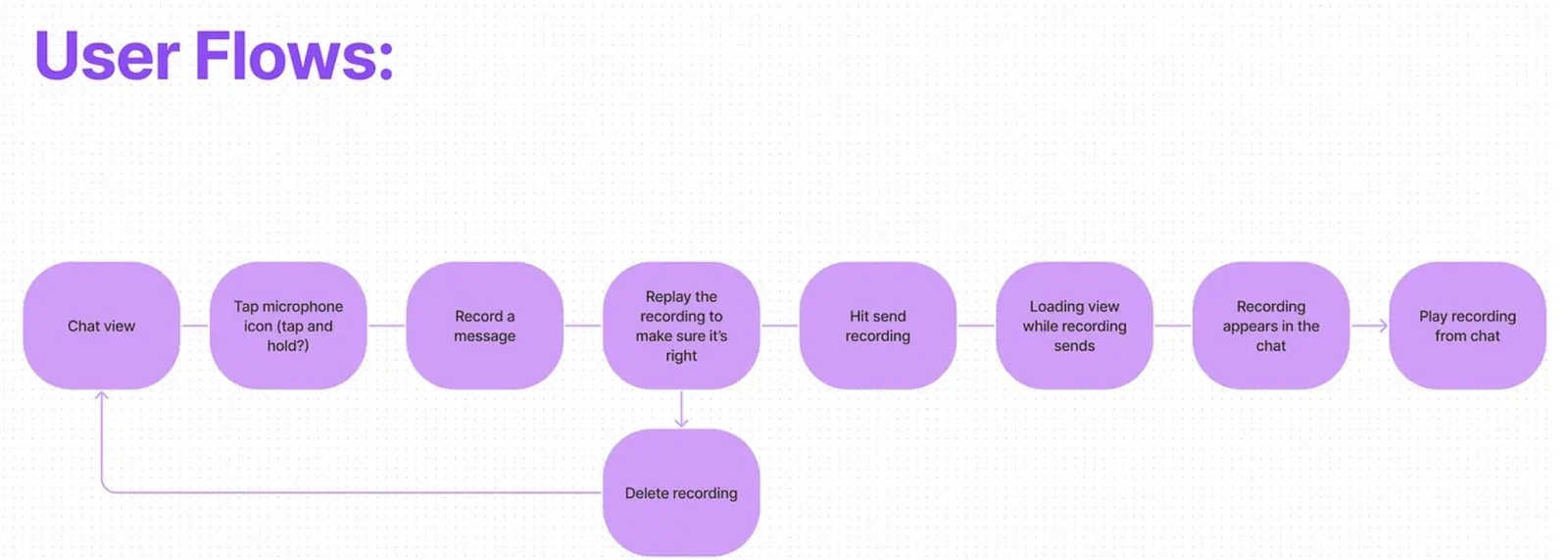
User Flow
Sketching & Wireframing: From Paper to Pixels
I started with hand-drawn paper sketches to rapidly explore different layouts and interaction models. Speed mattered here—the goal was to get ideas out of our heads and onto paper as fast as possible.
From there, I moved into low-fidelity wireframes in Figma, iterating through three distinct versions—each refined based on internal feedback and early user input.
- V1: Initial concept — establishing the core interaction model
- V2: Improved usability — refined based on team feedback and edge cases
- V3: Final wireframe — polished interactions informed by early user reactions
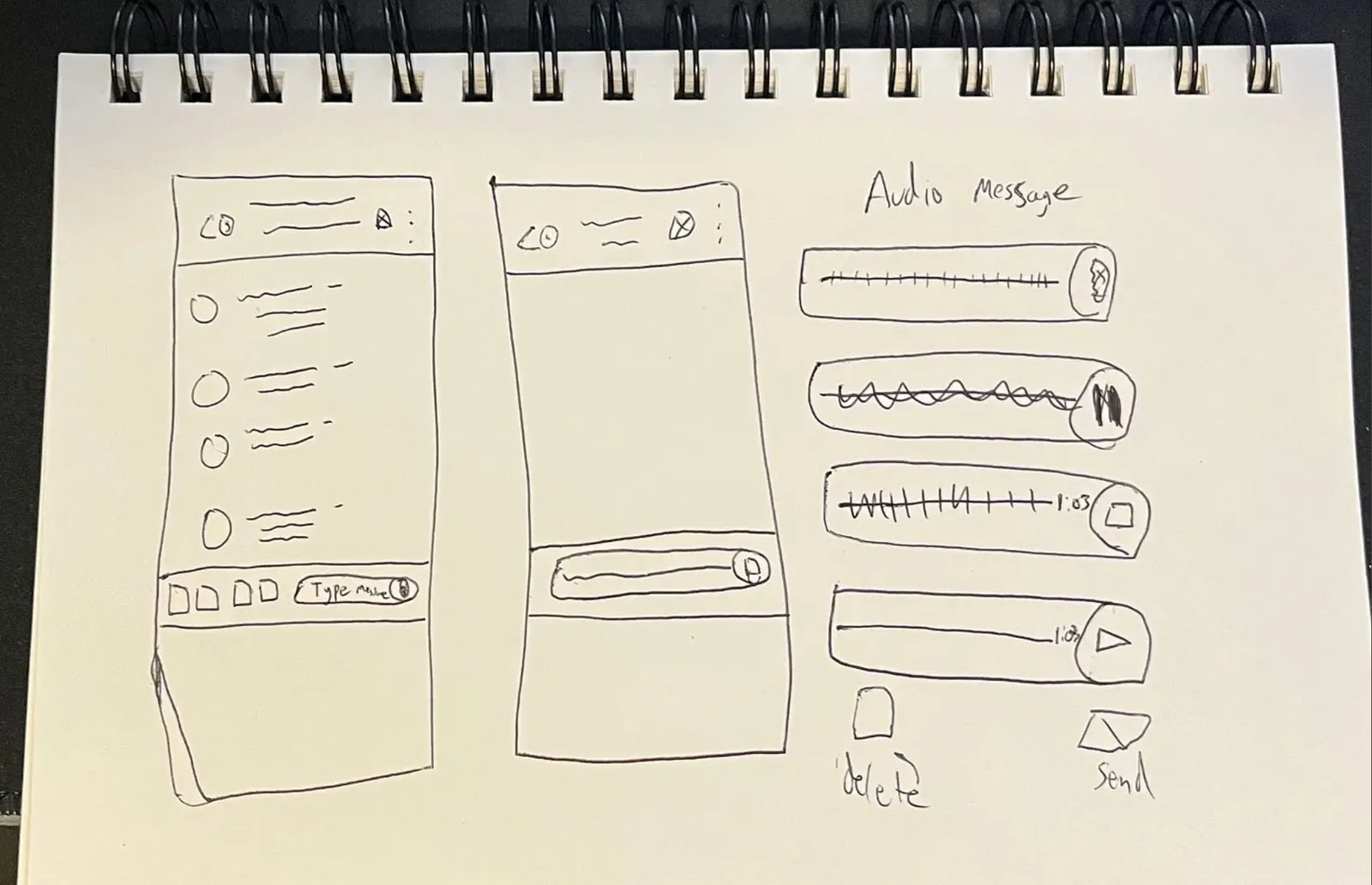
Paper Sketch
User Testing: Validating the Experience
We tested with 12 real users across different industries in 30–45 minute Zoom sessions, using a highly interactive Figma prototype that simulated the full recording, playback, and sending flow.
- "Very easy to use" — users quickly understood the feature with no training
- "We would use this primarily on mobile" — reinforced our mobile-first design decisions
- "Audio transcriptions would be a game-changer" — validated for future roadmap prioritization
- Consistent praise for design quality across both mobile and desktop
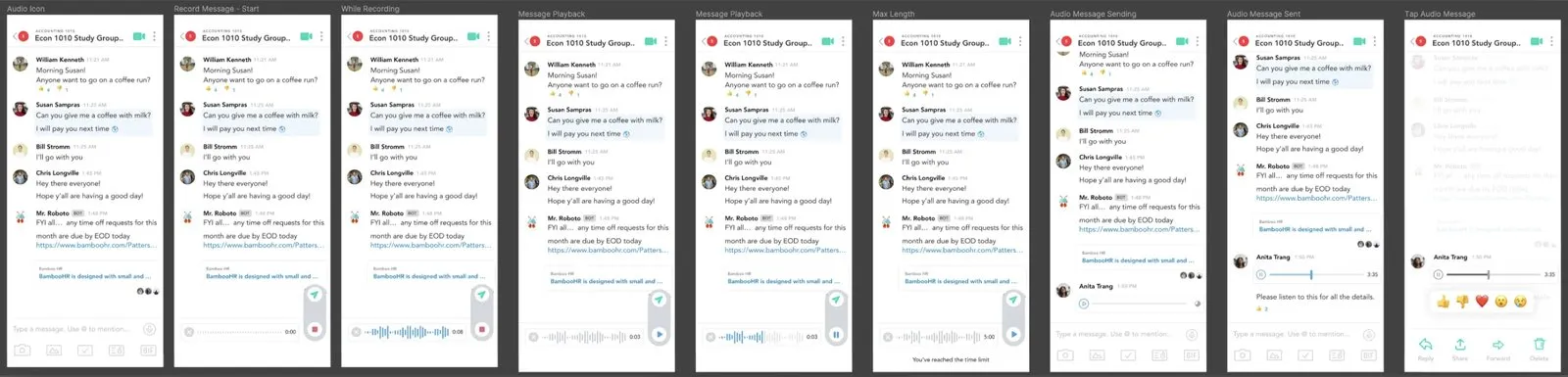
Low-Fidelity Mobile Wireframes
High-Fidelity Mockups
Based on user testing validation, I moved into production-ready high-fidelity mockups. These final designs maintained consistency across iOS, Android, and Web while optimizing each platform for its native interaction patterns.
iOS & Android Mockups
Final mobile designs refined through user testing—optimized for one-handed use and quick recording workflows.
Web Mockups
Desktop experience designed for power users who manage team communication from their browser.
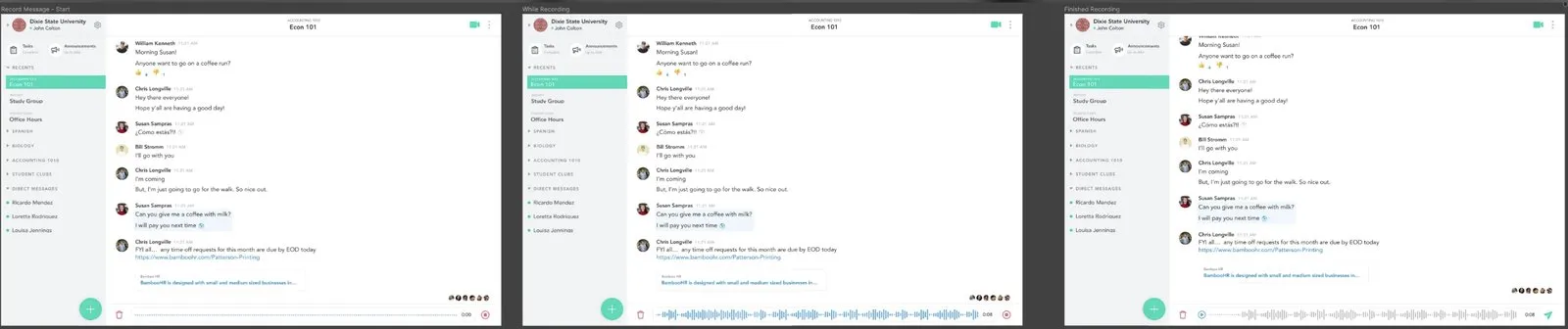
High-Fidelity Desktop Mockups
Results: Exceeding Every Target
The numbers told a clear story—audio messaging wasn't just adopted, it became a preferred communication method.
40%
Adoption Rate
60%
Engagement Rate
+10%
Adoption Goal Exceeded
+20%
Engagement Goal Exceeded
Users actively embraced audio messaging as their go-to communication tool. More messages were sent via voice than anticipated, proving the feature's value for sales teams and field workers who depend on speed.
Final Thoughts
This project was more than just adding audio messaging—it was about making communication faster, easier, and more natural for users who depend on it daily. We didn't just meet expectations—we exceeded them. Users actively embraced voice messaging as a preferred communication tool, sending more messages via voice than anticipated and proving the feature's value for sales teams and field workers who rely on speed.