Empowering Admins: Designing Org Management for Efficiency & Control
Empowering Admins with Robust Organization Management Tools
My Role
Lead UX Designer – UX Strategy, Research, Design & Execution
Team
Product Manager
3 Developers (iOS, Android, Web)
CTO
Results & Metrics
Targets
Manual Effort Reduction
Significant
Onboarding Time Improvement
50% reduction
Admin Adoption
Increase
Actual Results
Admin Portal
Cutting manual effort, saving 95 hours annually
Onboarding Time
Reduced by 60% via bulk user-to-group assignment
Admin Adoption
Increased by 45%
Overview
In industries like door-to-door sales, multi-level marketing, and education, managing large teams efficiently is critical. Users needed a robust admin tool to simplify onboarding, manage team structure, and control user access—without relying on external support. My challenge? Designing an intuitive Org Management system that empowers admins to efficiently oversee users, groups, and categories—saving time and eliminating manual workarounds.
The Problem
Admins were drowning in manual processes. With limited organization management tools, they couldn't deactivate or reactivate users without jumping through hoops, had no way to bulk-assign users to groups, couldn't manage categories without contacting support, and lacked visibility into user statuses. In high-turnover industries like door-to-door sales, these friction points compounded daily—costing teams hours of productivity every week.
Research Insights
Bulk-adding users to multiple groups would save significant time.
Deactivating and reactivating users easily was a high-priority request.
A clear UI indicator was needed to show when a user is deactivated.
Bulk deletion of groups was a top pain point.
Group permissions were missing, making access control difficult.
Design Process
Discovery Research
Deep discovery research with IT admin personas across sales organizations, pest control, security, and education.
User Interviews
6 IT admins from multiple industries. 30–45 minute recorded Zoom sessions uncovering admin pain points and workflows.
Core Requirements
Distilled insights into three pillars: People Management, Group Management, and Category Management.
Ideation & Whiteboarding
Cross-functional ideation sessions with product team and developers, followed by rapid paper sketching.
Lo-Fi Wireframes & Testing
Low-fidelity wireframes in Figma tested with 6 IT admins across 30–45 minute interactive prototype sessions.
Hi-Fi Designs & Implementation
Final iOS/Android and Web mockups in light and dark mode, validated through testing and shipped to production.
Testing Insights
"Deactivating/reactivating users was extremely intuitive—validated as a high-usage feature."
"Bulk-adding users to groups was well-received—major time saver for onboarding."
"The new Person Details page gave admins deeper insights into user activity."
"Creating categories on the fly was highly appreciated—eliminated support calls."
"Bulk-adding groups into categories was a top requested feature, now delivered."
Discovery Research: Understanding Admin Pain Points
I began with deep discovery research to pinpoint the frustrations and expectations of IT admins managing large teams on Pronto. By focusing on the people who live in these admin tools every day, I created data-driven personas that guided every design decision.
These personas weren't static profiles—we continuously updated them based on new insights throughout the project, ensuring our designs stayed grounded in real-world workflows.
Example Persona: IT Admin for a Sales Organization
- Manages hundreds of sales reps with high turnover
- Needs clear visibility into user statuses (active, inactive, pending)
- Wants to automate repetitive tasks like onboarding and group assignments
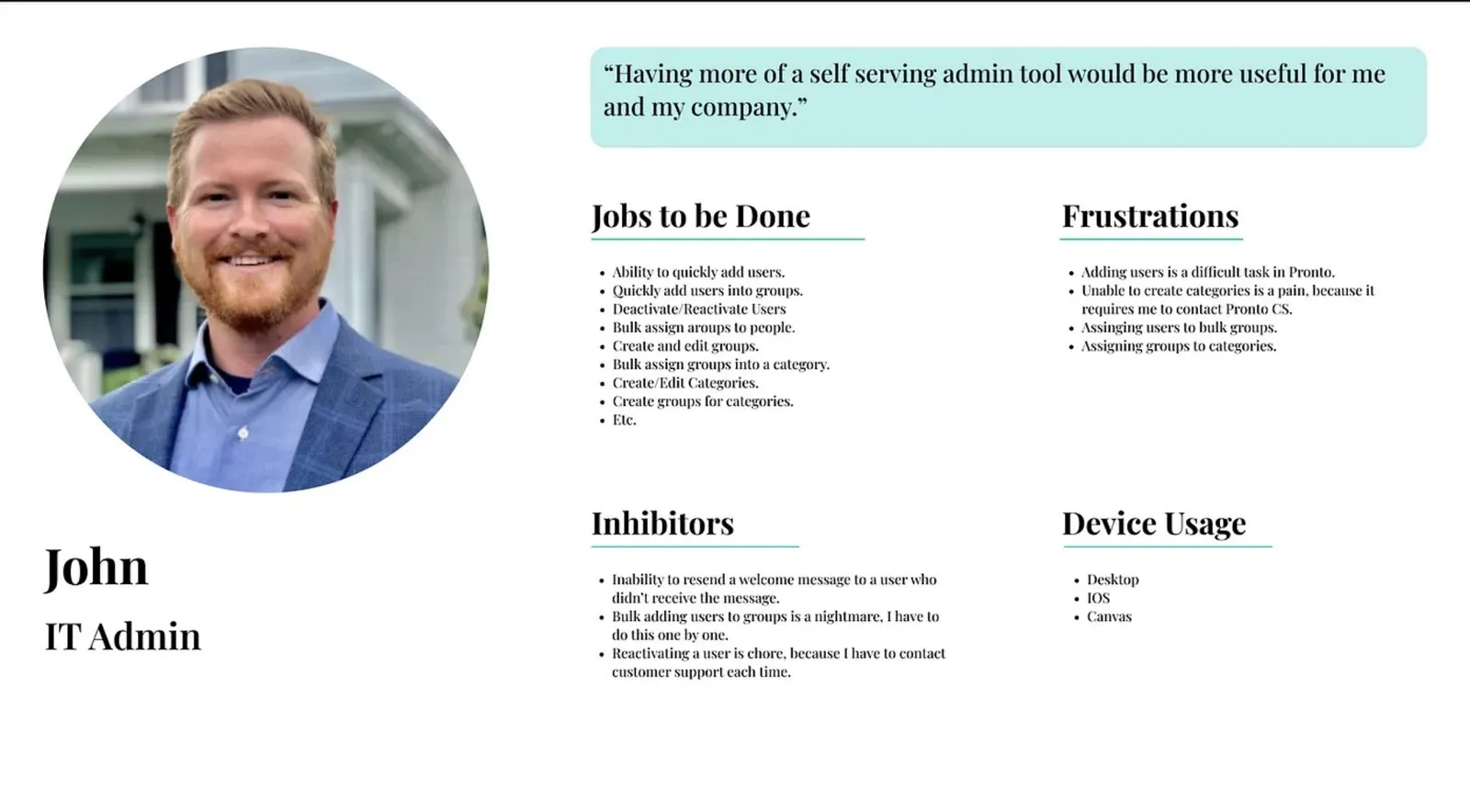
Example Persona: IT Admin for a Sales Organization
User Interviews: Hearing From the Experts
We interviewed 6 IT admins from pest control, security, and education industries—the people directly responsible for managing their company's Pronto organization. Sessions were scheduled through our customer success team and conducted as 30–45 minute recorded Zoom calls.
Key Questions We Asked
- How do you currently use Org Management?
- What features do you wish existed?
- In an ideal world, how could Org Management work better?
Insights That Shaped Our Solution
- Bulk-adding users to multiple groups would save significant time
- Deactivating and reactivating users easily was a high-priority request
- A clear UI indicator was needed to show when a user is deactivated
- Bulk deletion of groups was a top pain point—admins struggled with group management
- Group permissions were missing, making it difficult to control user access
Defining the Core Requirements
Our research revealed three core pillars that would drive the entire redesign. By focusing here, we could eliminate the most time-consuming manual processes and make Pronto's admin tools truly scalable.
People Management
- Add, edit, deactivate, and reactivate users
- Bulk-assign users to groups
- Resend welcome messages for quick onboarding
Group Management
- Create, edit, and bulk-add members to groups
- Manage group permissions and access control
- Bulk deletion of groups
Category Management
- Create and edit categories without contacting support
- Organize groups into categories efficiently
- Bulk-add groups into categories
Ideation & Whiteboarding
I led a cross-functional ideation session, bringing together the product team and developers to brainstorm solutions collaboratively. After whiteboarding key flows and edge cases, I moved into rapid paper sketching—getting ideas out fast before committing to digital mockups.
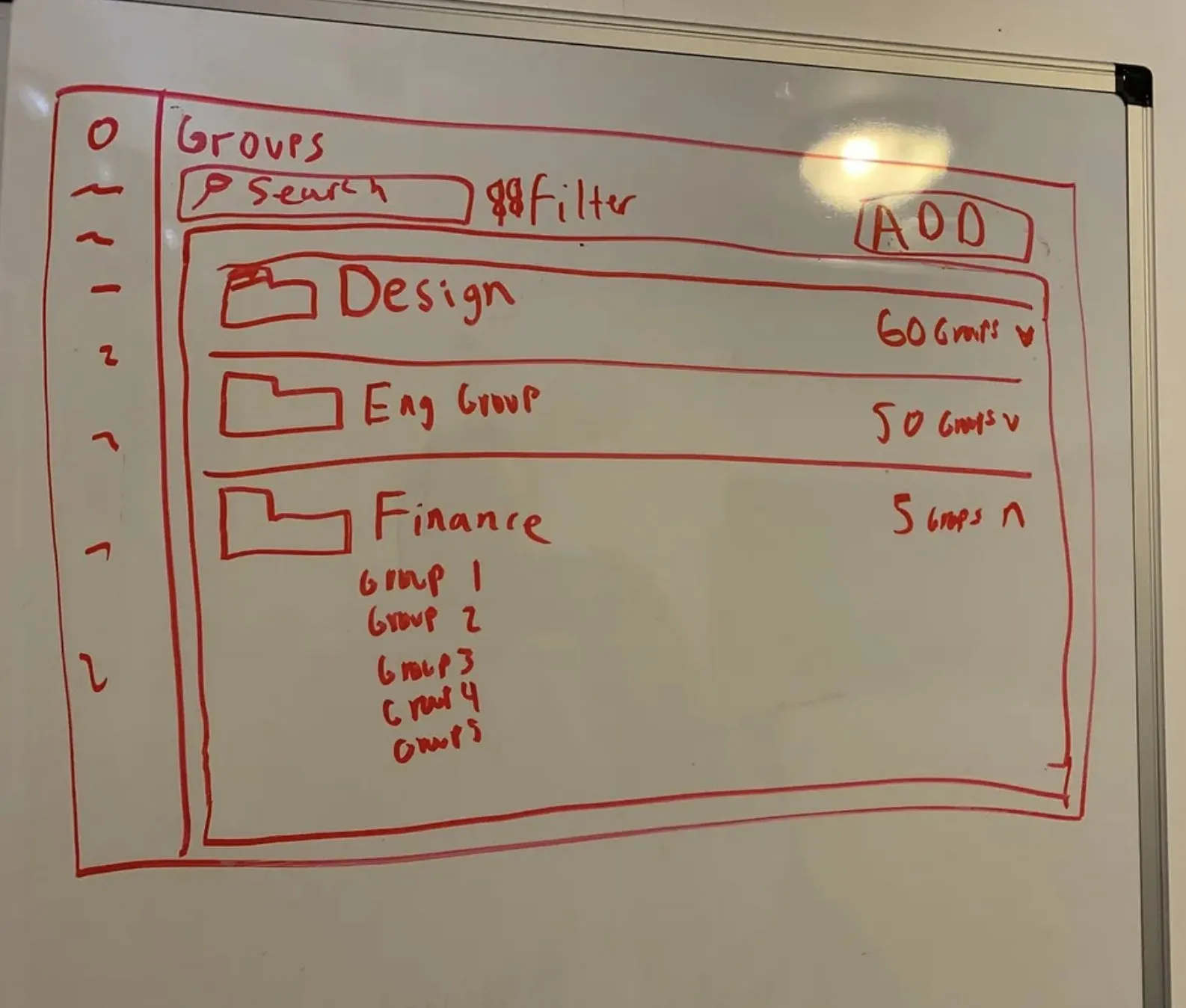
Whiteboarding Session
Low-Fidelity Wireframes & User Testing
Once the core flows were mapped out, I created low-fidelity wireframes in Figma. These were tested early and often to validate usability before investing in high-fidelity designs.
We tested with 6 IT admins who manage large teams across multiple industries in 30–45 minute Zoom sessions using interactive Figma prototypes. Users walked through real tasks like adding, deactivating, and reactivating users.
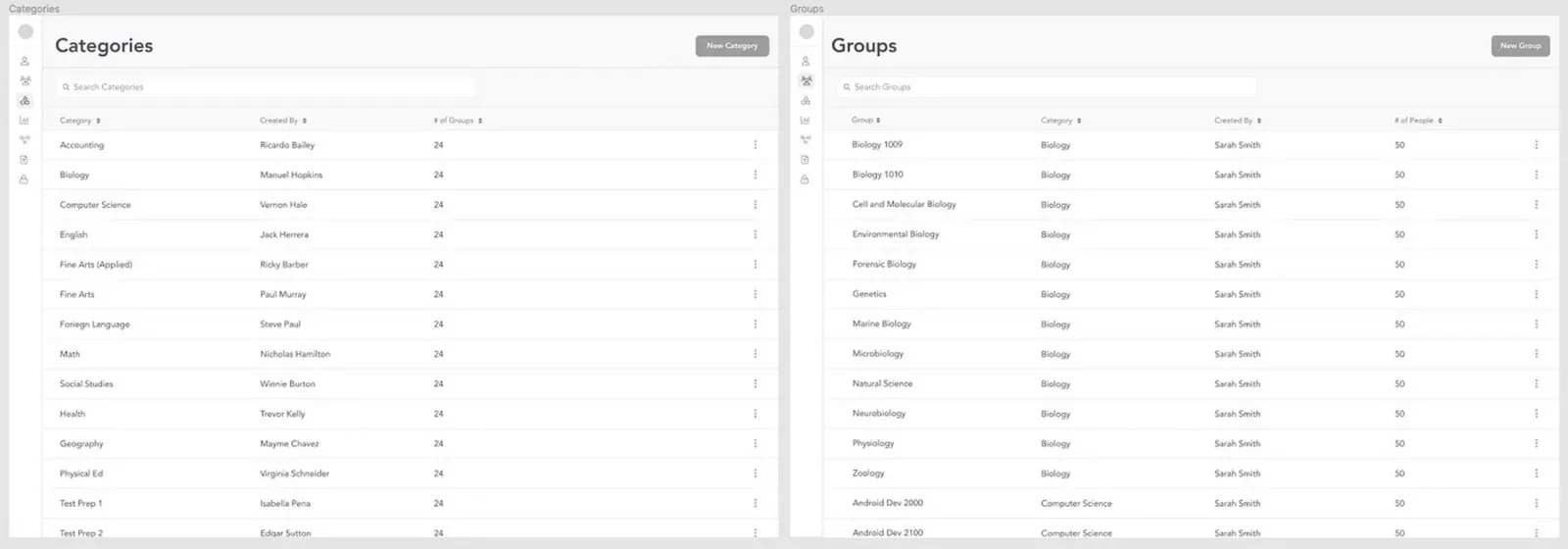
Desktop Lo-Fi Mockups
Testing Insights & Design Refinements
User testing validated our core design decisions and surfaced refinements across all three pillars of the admin experience.
People Management
- Deactivating/reactivating users was extremely intuitive—validated as a high-usage feature
- Bulk-adding users to groups was well-received and simplified the onboarding workflow
- The new Person Details page gave admins deeper insights into user activity
Group Management
- Admins loved the ability to bulk-assign users to groups—huge time saver
- Creating a new category on the fly was highly appreciated
Category Management
- Admins were thrilled to see category management included—eliminated calls to customer support
- Bulk-adding groups into categories was a highly requested feature, now delivered
User Testing Questions
We structured our testing around task-based scenarios across all three management areas to validate real workflows.
People Questions
- How would you add a person to your org?
- How would you add that person to multiple groups?
- Walk me through deactivating a user — now reactivate them
- How would you resend a welcome message?
- Is there anything you would change?
Groups Questions
- How would you create a group?
- How would you assign people to this group?
- Walk me through changing a group's category
- Is there anything you would change?
Category Questions
- How would you create a category?
- Now that you've created one, what would you do next?
- Is there anything you'd change about this flow?
High-Fidelity Designs
Based on user testing validation, I moved into production-ready high-fidelity mockups. These final designs were delivered across iOS, Android, and Web—with both light and dark mode support.
iOS & Android Mockups
Final mobile designs in both light and dark mode—optimized for admin workflows on the go.
Web Mockups
Desktop admin experience designed for power users managing large organizations from their browser.
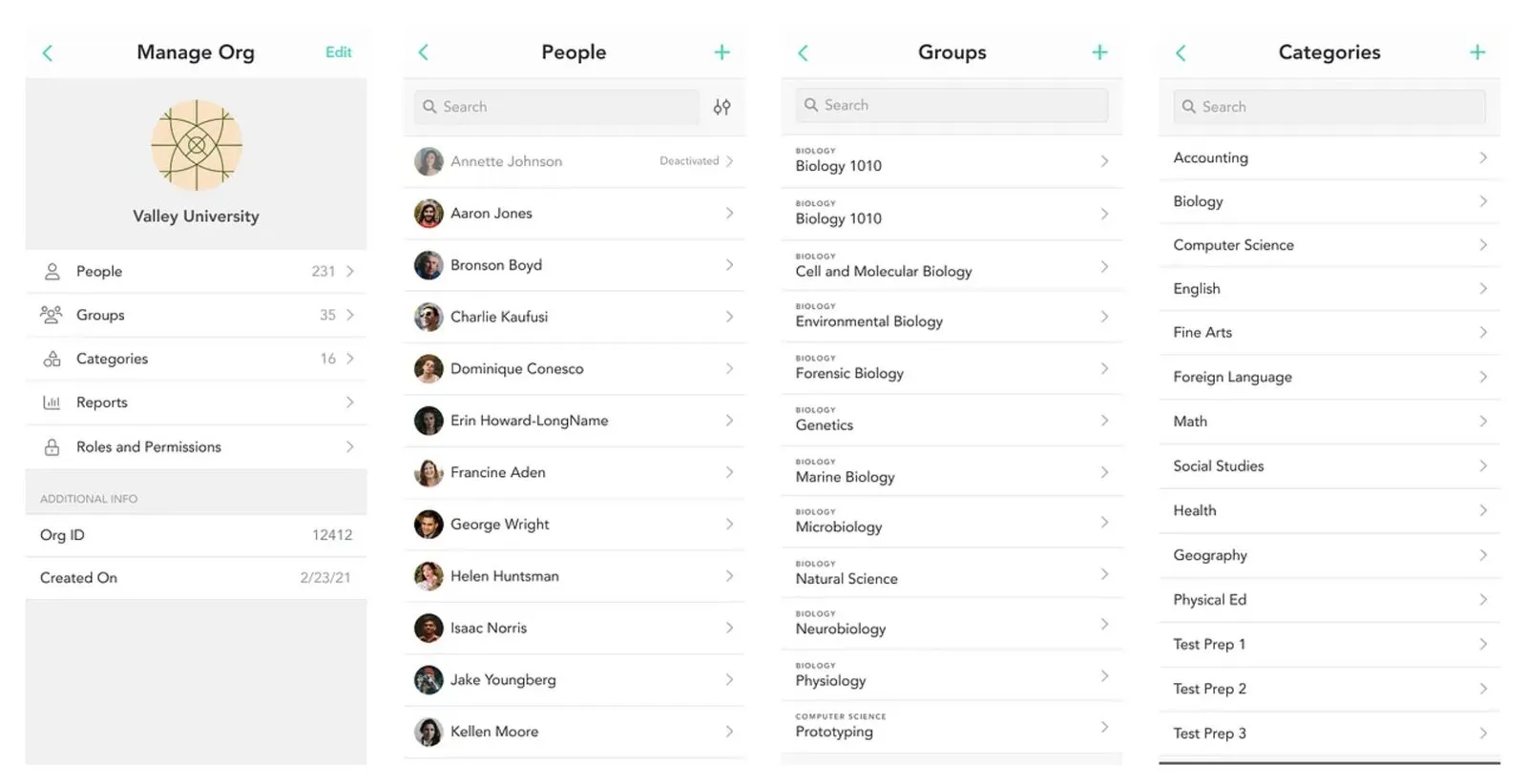
iOS Mockups — Light Mode
Results: Measurable Impact
The numbers validated what testing had already told us—Org Management became an indispensable tool for Pronto admins.
95
Hours Saved Annually
60%
Onboarding Time Reduction
45%
Admin Adoption Increase
- Admins manage users effortlessly without contacting customer support
- Sales teams onboard faster, reducing friction in high-turnover industries
- Pronto became a more scalable platform capable of supporting larger organizations
Final Thoughts
This project wasn't just about improving Org Management—it was about giving admins complete control over their teams. By listening to users, iterating rapidly, and collaborating across teams, we created an admin portal that eliminates frustration and saves countless hours. Admins can now manage users effortlessly without contacting support, sales teams onboard faster in high-turnover industries, and Pronto became a more scalable platform capable of supporting larger organizations.